

AI Learnings
The Synergy of AI Audio and Visuals in Modern Web Design
Read More
/18 Aug 2025


Remember the first time you saw an AI-generated image? The weird, distorted fingers and the slightly off-kilter faces? While AI has come a long way since then, there’s always been room for improvement, especially when it comes to specific tasks like creating product photos or editing images with simple commands.
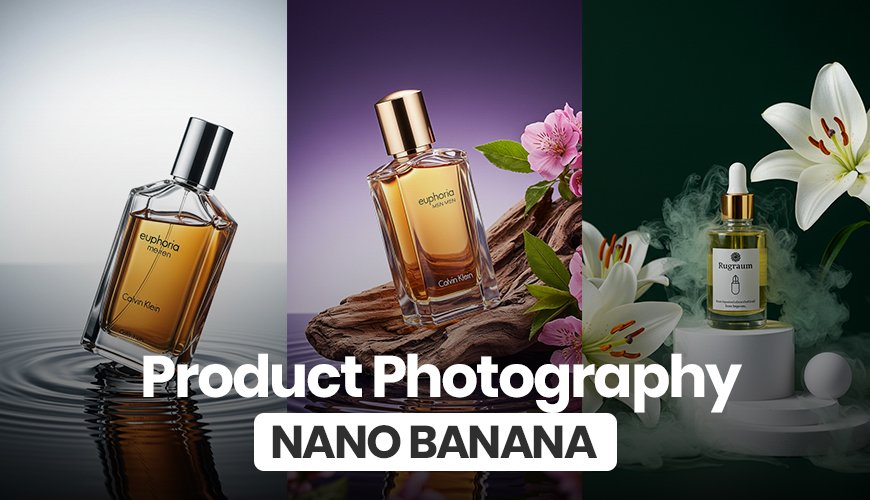
Well, get ready, because Google just dropped what might be the biggest game-changer yet: a new image generation model called Gemini 2.5 Flash. You might have heard it's nicknamed "Nano Banana," and people on the internet are going crazy over it.
And for good reason. This isn't just another AI tool. It's a powerful, free, and incredibly smart model that can do things we never thought possible. In this guide, we'll take a deep dive into what makes Nano Banana so special, what its strengths and weaknesses are, and how you can use it to create amazing images, even if you’re a complete beginner.
First things first, what exactly are we talking about? Nano Banana is the fun nickname for Google’s latest and greatest AI image generation model, officially known as Gemini 2.5 Flash. It's designed to be smarter, faster, and more creative than previous models.
What makes it stand out is its ability to understand and work with images in a way that feels almost human. You can upload an image and then "talk" to the model, telling it what you want to change, add, or remove. This turns a complex editing process into a simple conversation.
And the best part? It's completely free to use. All you have to do is go to gemini.google.com and make sure you're using the Gemini 2.5 Flash model, which you can check in the top-left corner.
To really understand the power of this new tool, let's look at some real examples. We’ll see how Nano Banana handles a few different products, each with its own unique challenges.
Example 1: The Hot Sauce Bottle
Our first challenge involves a bottle of hot sauce. The goal is to take a simple product photo and place it into a dynamic, interesting scene.
The Flat Lay Challenge: The first task was to create a flat-lay photo of the hot sauce bottle laying among some chicken wings. This is a classic product photography style. The user provided an image of the hot sauce bottle (with the background removed) and a reference image of a flat lay scene. The prompt was simple: "Create a flat lay of the hot sauce bottle laying amongst chicken wings."
The Result: The result was impressive. Nano Banana perfectly placed the bottle in the scene, and the label was reproduced flawlessly. The lighting could have been better, but for a first try, it was a solid win.
The "Half-Submerged" Challenge: Next, we tried something much harder. The goal was to make the hot sauce bottle look like it was half-submerged in a pool of orange hot sauce. The user provided the product image and a reference image of a tube floating in water.
The Result: This is where Nano Banana blew everyone away. The AI created a stunning image of the bottle floating in the sauce, with chicken wings scattered around it. The label was still perfect, and the AI even added a little bit of sauce dripping from the cap, making the image look incredibly realistic. This kind of complex editing would be a nightmare in a traditional program like Photoshop, but the AI handled it with ease.
The "New Perspective" Challenge: The final challenge for the hot sauce bottle was to change the camera angle. The user wanted to see the scene from a different perspective—from the surface level—with a hand holding the bottle out of the hot sauce.
The Result: The result was mind-blowing. The AI created an image with perfect studio lighting, and the hand holding the bottle looked realistic. The sauce was dripping down the bottle in a high-quality way, and most importantly, the label was nearly 100% intact. This single image shows just how powerful Nano Banana is at understanding and recreating complex scenes from a simple request.
Example 2: The Pink Coffee Bag
The next test involved a pink bag of coffee beans. The user wanted to place this bag into a specific environment.
The "Adding to an Environment" Challenge: The user provided an image of the coffee bag and a reference photo of a scene they wanted the bag placed in. The initial result was good, but the lighting was a bit flat.
The "Dramatic Lighting" Challenge: This is where Nano Banana’s editing capabilities came in handy. The user simply asked the AI to change the lighting to something more dramatic. The AI understood the request and generated a new image with moody, high-contrast lighting that perfectly fit the product. This ability to change complex elements like lighting with just a simple command is a huge benefit for anyone who doesn't have advanced editing skills.
Example 3: The Prime Hydration Bottle
For the final test, the user wanted to push the model to its limits by making multiple changes to a single image. The product was a Prime Hydration bottle.
The "Talk-to-the-Image" Challenge: The process started with a basic product shot. From there, the user made a series of requests:
"Give it more dramatic lighting."
"The highlight is too harsh, make the background darker."
"Place blue raspberries on the glass surface."
"Place some blue raspberries inside the ice with the can."
The Result: The model successfully handled every single request. While the final image had a few minor distortions, the fact that you can have a conversation with the AI to continuously refine and change an image is a game-changer. It shows the incredible flexibility and power of the model as both a creator and an editor.
Example 4: The YoPro Bottle
This example focused on matching perspective and camera angles. The user wanted to place a YoPro bottle into a scene with a tilted, "looking up" camera angle, similar to a reference image.
The "Match My Vibe" Challenge: The user asked the AI to place the bottle among blueberries and blueberry bushes, keeping the same tilted camera angle from the reference image.
The Result: The AI nailed it. The final image perfectly matched the perspective of the reference photo, and the bottle was seamlessly integrated into the new environment. The label was slightly warped, but the overall result was a stunning and unique product shot that would be nearly impossible to create from scratch without a professional photoshoot.
After seeing these examples, it's clear that Nano Banana isn't just another AI image generator. It's in a league of its own for several key reasons:
Unmatched Label and Text Fidelity: This is one of the biggest problems with most AI image models. They struggle to get text and labels right. Nano Banana's ability to keep product labels almost 100% intact is a massive leap forward, making it perfect for product photography.
Conversational Editing: The ability to "talk" to the image and make changes on the fly is a huge innovation. It democratizes the creative process, allowing anyone—from business owners to hobbyists—to create professional-looking images without needing to learn complex software.
Seamless Integration: Nano Banana can take an existing product image and integrate it perfectly into a new environment, matching lighting, composition, and perspective. This makes it an incredibly powerful tool for marketers, designers, and e-commerce sellers.
Superior Quality: When compared to other popular models like the one in ChatGPT, Nano Banana’s output is night and day. The images are higher quality, the details are more accurate, and the results are much closer to what you’d expect from a professional photo shoot.
Google's Gemini 2.5 Flash, or Nano Banana, is more than just a new tool—it's a paradigm shift. Its unique ability to understand and manipulate images through simple conversation makes it an accessible and powerful solution for anyone looking to create high-quality visuals.
While there may be a few minor kinks to work out, the potential of this model is limitless. It's a tool that empowers creativity, breaks down technical barriers, and proves that AI is getting smarter and more intuitive every single day. If you're looking for a free and powerful AI image generator that can handle complex tasks with ease, give Nano Banana a try. You won't be disappointed.
1. What is Nano Banana? Nano Banana is the popular nickname for Google's new AI image generation model, Gemini 2.5 Flash. It's a free tool that allows you to create and edit images by simply typing what you want to see.
2. How is it different from other AI image models like Midjourney or Dall-E? Nano Banana stands out because of its superior ability to accurately reproduce product labels and text, its conversational editing features, and its skill in seamlessly integrating products into new environments while matching lighting and perspective.
3. Is Nano Banana free to use? Yes, Nano Banana is completely free. You can access it by going to gemini.google.com and selecting the Gemini 2.5 Flash model.
4. Can I use my own images with Nano Banana? Yes, you can upload your own images and use them as a starting point. The AI can then edit, change, and manipulate them based on your text prompts, making it a powerful editing tool.
5. What is the biggest strength of this new model? The model's biggest strength is its ability to handle complex and multi-step requests. It can change lighting, add or remove elements, and even adjust the camera perspective of an image, all while maintaining a high level of quality.
6. What are the main uses for Nano Banana? It is especially useful for product photography, creating flat-lay images, and generating high-quality visuals for marketing and e-commerce. It can also be used for creative projects and general image editing.